Aurora One

Aurora Vault · An encrypted vault for Windows

Your private files, locked with your password, with the limits stated.

Aurora Vault encrypts your files with Windows' own cryptographic building blocks (CNG): contents and file names cannot be read while it is locked. We have no algorithm of our own and no back door; if you lose both your password and your recovery key, we cannot open the vault either. We say up front that malware can read a vault while it is open and that no independent cryptography review has been done yet.

21 languages

  • 19 / 0 / 0 steps passed / failed / skipped in the acceptance run on a real computer with normal user rights (11 October 2026)
  • 40/40 deliberately inserted faults were all caught by the tests (mutation run)
  • No review yet no independent cryptography review has been done; the design is documented and an outside review is recommended before release
  • 1 vault free unlimited vaults with a licence; encryption strength is never reduced in any edition
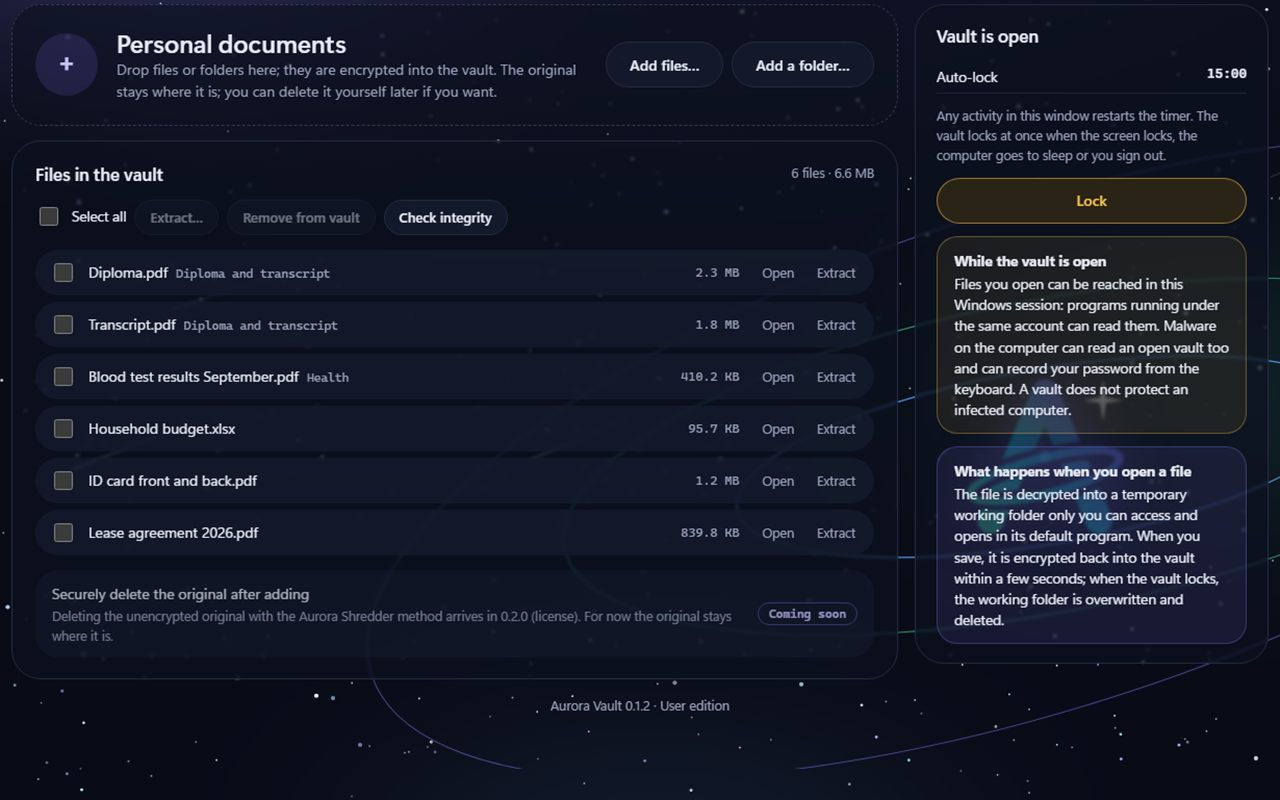
Aurora Vault Open vault screen: the list of files in the vault, the Add files and Add a folder buttons, Check integrity, and on the right the auto-lock timer and the Lock button.
Example view · sample data, taken with test files; names and numbers on screen are examples

Three promises

No home-made cipher, no back door, and we say what we know

In an encrypted vault the most important thing is knowing what you are trusting and where that trust ends. Aurora Vault writes down both.

Uses Windows' own cryptography

Every building block comes from Windows CNG: AES-256-GCM encryption and a PBKDF2-SHA256 password key (600,000 rounds). We do not invent our own algorithm.

  • Every file is encrypted with its own key
  • File names are encrypted too and cannot be read while locked

We cannot open it either

If you lose your password and your recovery key together, the vault cannot be opened; there is no back door, on purpose. The recovery key is shown only once.

  • Opening with the recovery key sets a new password in the same step
  • Changing the password does not re-encrypt the files

Tampering is noticed

Every chunk is authenticated. A chunk that was changed, cut off or moved, or brought from another file or an older state, is caught when it is opened; no corrupt data is returned silently.

  • Putting an old index back raises a warning
  • If the main index is damaged, the previous generation is used

How it looks

My vaults, open vault, new vault, settings

You move between screens with the tabs at the top. The screens below are example views of the program's real interface, taken with test files; names and numbers are sample data.

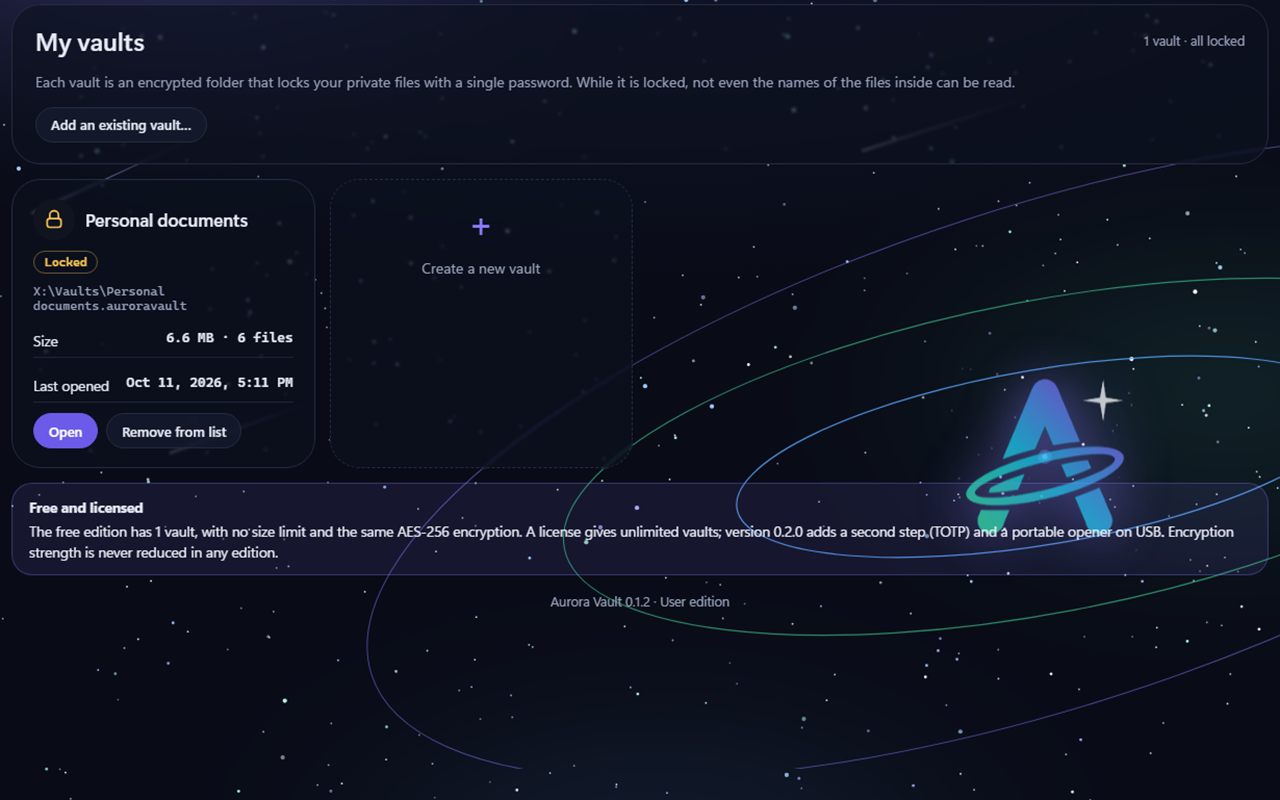
Aurora Vault My vaults screen: a locked vault card with the Open and Remove from list buttons, Create a new vault, and the Free and licensed note.
My vaultsEach vault is an encrypted folder locked with a password. While locked, its size and file count are visible; the names of what is inside are not.
Aurora Vault Open vault: the file list with Open and Extract links, a Coming soon badge on the Securely delete the original row, and on the right the Lock button and warning boxes.
Open vaultDrop or add files; open them from the vault, extract them, check integrity. On the right are the auto-lock timer and what is risky while the vault is open.
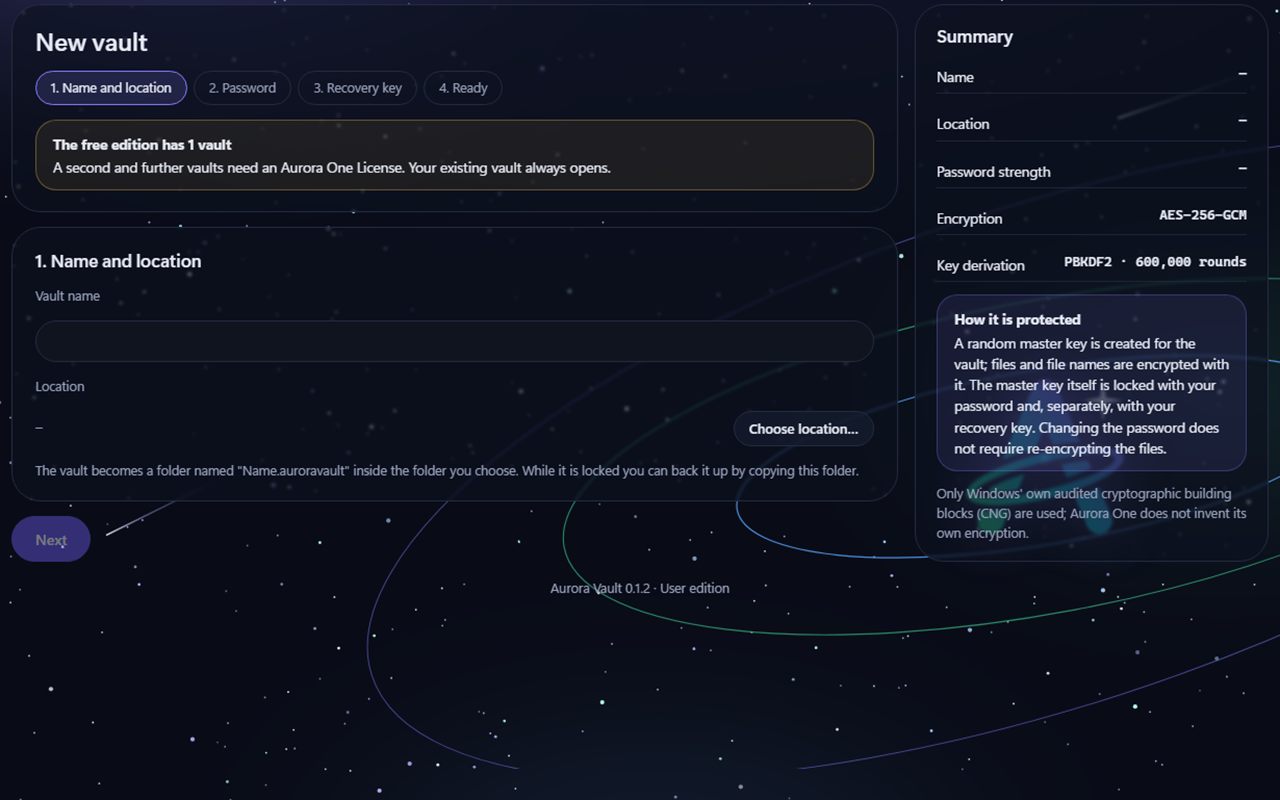
Aurora Vault New vault screen: four steps (name and location, password, recovery key, ready), the free edition 1-vault note and an encryption summary on the right.
New vaultName and location, password (with a strength indicator), recovery key (shown once) and done. The summary on the right states which encryption is used.
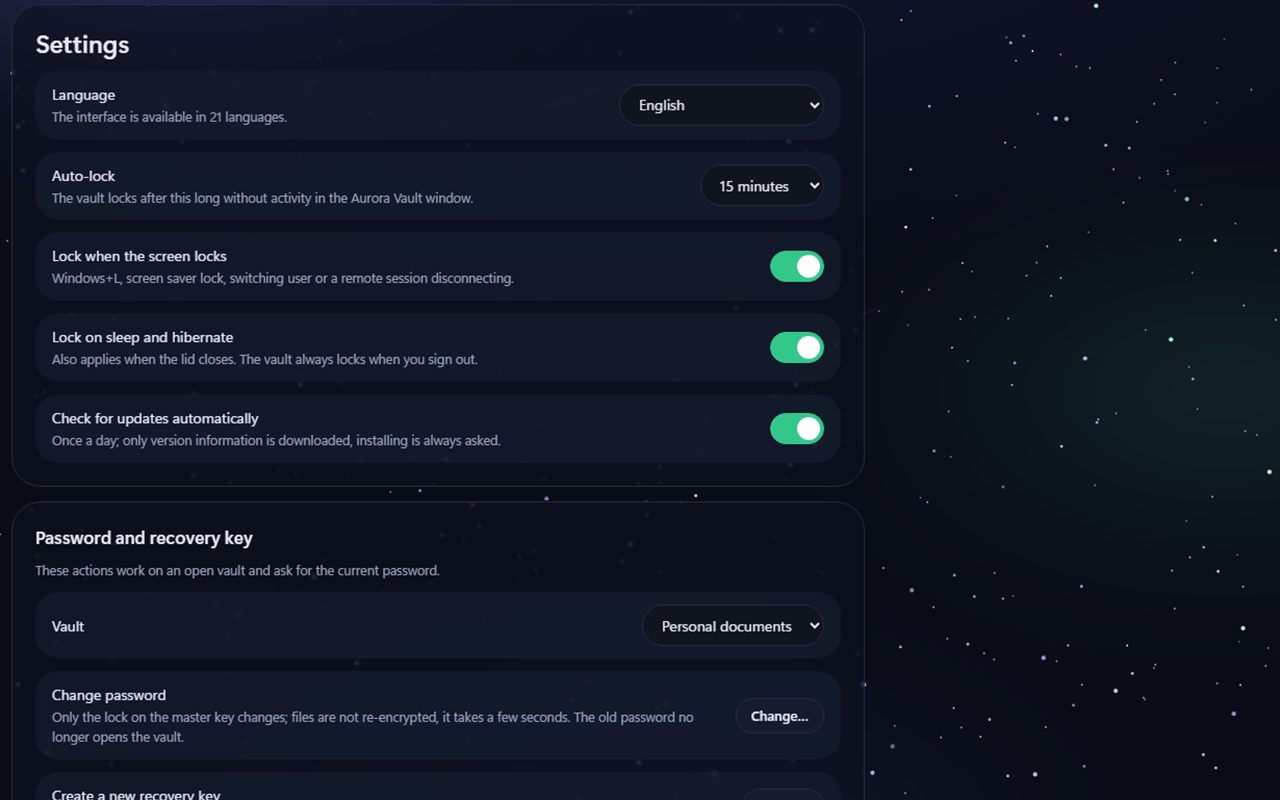
Aurora Vault Settings screen: language, auto-lock, switches for locking when the screen locks and on sleep, change password and create a new recovery key.
SettingsLanguage (21 languages), auto-lock time, locking on screen lock and sleep, changing the password and creating a new recovery key.

What it can do

Keeps files in an encrypted vault and does not open it unless you do

Features with a Beta badge were coded and tested in a test environment but have not yet been fully tried in real conditions. Features with a Coming soon badge are not in the program yet.

An encrypted vault folder

A vault is a folder named "Name.auroravault"; while it is locked you can back it up by copying it. File contents and names are encrypted; only random identifiers show on disk. A vault cannot be open in two places at once.

Password and recovery key

The password is turned into a key with PBKDF2-SHA256 over 600,000 rounds (Turkish characters are normalised). The recovery key is 160 random bits; it can be copied, printed or saved to a file and is shown only once, when it is created. Changing the password takes a few seconds and does not re-encrypt the files.

A delay after a wrong password

After wrong attempts the wait grows from 1, 2, 4… seconds up to 30 seconds. This delay only slows attempts made in this program; it has no effect if the vault folder is copied, so choose a long password. The vault is never deleted.

Adding, extracting, integrity

You drag and drop files and folders or add them with a button; the original stays where it is. Extracting never overwrites an existing file. "Check integrity" reads and verifies every file. Large files are streamed, not loaded into memory.

Opening and editing a file from the vault Beta

When you open a file it is decrypted into a temporary working folder that only your Windows account can reach and opened with its default program. When you save, it is encrypted back into the vault within 2 seconds; when the vault locks, the files in the working folder are overwritten with zeros and deleted. It has not yet been tried with a real program such as Word or Notepad.

Auto-lock and lock events Beta

Auto-lock can be 5, 15, 30 or 60 minutes or never. The vault locks when the screen locks, the user switches, a remote session disconnects, the computer sleeps and when you sign out. These events were tested with a decision table and simulated messages sent to the running program; a real Windows+L, sleep and sign-out have not been tried by hand.

Interruption-safe writing

Files are first written under a temporary name and flushed to disk, then renamed; the index is updated last. If the program dies in between, at worst the file added last is missing and the earlier ones are intact. Half-written files are cleaned up at start.

21 languages Beta

The interface is available in 21 languages; Arabic and Urdu are shown right to left. The translations passed automatic checks and a back-translation check; review by native speakers is still under way.

Second step (TOTP) Coming Soon

Asking for a time-based one-time code in addition to the password when opening the vault. It is not in the program yet; it is planned for version 0.2.0 and will need a licence.

Opening from a USB stick (portable opener) Coming Soon

Opening the vault on a computer without Aurora Vault installed, with a small opener kept on a USB stick. It is not in the program yet; it is planned for version 0.2.0 and will need a licence.

Securely delete the original after adding Coming Soon

Deleting the unencrypted original of a file added to the vault with the Aurora Shredder method. It is not in the program yet (version 0.2.0, licence); for now the original stays where it is and you delete it yourself.

Measured, written down

We tested the encryption with known test vectors and tampering

On 11 October 2026 an acceptance run was done on a real computer with normal user rights (not administrator). The tests used only synthetic sample files; your real files and your real data folder were never touched.

We tested the encryption with known test vectors and tampering
TestedResultHow it was verified
Acceptance run (normal user rights)19 steps passed, 0 failed, 0 skippedEnd to end with the command-line program: create, add, lock, open, extract, password and recovery
Build testsUser 50/50, Administrator 11/11, installer 61/61Test suites that run during the build
Known cryptographic test vectorsAll passedNIST GCM document Test Cases 13–16 for AES-256-GCM, RFC 7914 for PBKDF2-HMAC-SHA256 and RFC 5869 for HKDF; the vectors were also checked independently with Node.js
TamperingAll caughtA single bit (11 positions), swapping chunks, cutting off the last chunk, a chunk from another file or an older state, another vault's header, lowering the round count, putting an old index back
Name leakage in a locked vaultNo file names, content markers or extensions foundThe raw bytes of a locked vault were searched as UTF-8 and UTF-16; names on disk are random identifiers only
Killing the program while writingEarlier files intact, no half-written filesThe process was killed at 5 specific stages and at 6 random moments
Changing the passwordEncrypted files stayed byte for byte identicalTest and an acceptance step: only the password wrapping is redone
Large fileA 2.2 GB synthetic file was added and decrypted, SHA-256 identical, memory growth under 200 MBA sparse test file was streamed and verified without being written to disk
Panel securityAttempts from other sites and processes were rejectedOnly 127.0.0.1, Host check, cookie, CSRF and Origin checks, no inline scripts
Mutation runAll 40 of 40 inserted faults were caughtFaults were deliberately put into the code to see whether the tests caught them
Interface, 21 languages214 screens measured: horizontal scrolling, overflowing text and script errors all 0Automatic measurement; the images were looked at by eye only in Arabic, Urdu, Tamil and German
  • No independent cryptography review has been done yet. The encryption design is written down and was tested with known vectors, but it has not been examined by an outside expert; we recommend this be done before release.
  • A real screen lock (Windows+L), sleep and sign-out were not tried by hand; opening a file was not tried with a real program such as Word or Notepad. The installer has so far been tested only in test mode.
  • These are measurements made on a single computer; they do not promise the same result on every computer.

What we leave out on purpose

What we do not do, and should not

We leave out things that are common in encryption tools but either misleading or risky.

No back door and no password recovery

We cannot recover your password and we cannot open your vault for you. If the password and the recovery key are lost together, the contents do not come back. We do not loosen this for convenience.

No cipher of our own

Encryption uses Windows' own audited building blocks (CNG). Methods that do not come with Windows, such as Argon2id, are not there for now; they will be considered in 0.2.0.

No virtual drive letter

Decrypting contents on the fly and showing them as a drive such as K: needs a kernel driver. Instead you open files from the window and we encrypt them back into the vault when you save.

Limits

What it does not do

Knowing what a vault cannot protect matters as much as knowing what it protects. We say these up front:

Aurora Vault protects a locked vault. It does not protect a vault while it is open or a computer that has malware on it, and it does not replace antivirus.

  • If your password and your recovery key are lost together, the vault cannot be opened; we cannot open it either.
  • While the vault is open, programs in the same Windows session can reach the files you opened. Malware that logs keystrokes, watches memory or runs with administrator rights can see an open vault and your password too.
  • Even when locked, the number of files, the approximate size of each file, the change times and the name of the vault folder can be seen; file names and contents cannot.
  • The wrong-password delay only slows attempts made in this program. Someone who gets hold of your vault folder can try guesses without the program; a weak password can still be broken. Choose a long password.
  • The password reaches the panel as text and cannot be fully erased from memory in .NET; the page file or the hibernation file may contain a memory image.
  • On an SSD, because of wear levelling and the file system journal, there is no guarantee that the temporary copy in the working folder leaves no trace in old blocks; programs such as Office may write their own temporary copies outside the vault. Use BitLocker for full assurance.
  • No independent cryptography review has been done yet.
  • A real screen lock, sleep and sign-out, and open-and-save with Word or Notepad, have not yet been tried by hand.
  • Adding a very large folder (tens of thousands of files) through the browser may be slow.
  • It has not yet been tested on Windows 10; the acceptance tests were run on Windows 11.

Free use and licence

One vault for free

The free edition has 1 vault, with no size limit and no weaker encryption. A licence opens unlimited vaults. Opening an existing vault, adding it, removing it from the list and changing its password are always free; if your licence ends, your existing vaults keep opening. Aurora Vault is not sold separately: it comes with the Aurora One Licence.

For everyone

Free use

Free

One vault, full-strength encryption.

  • 1 vault, no size limit
  • The same AES-256-GCM encryption
  • Opening, adding, removing from the list, changing the password
  • Not included: A second and further vaults

All programs, one licence

With the Aurora One Licence

Unlimited vaults. The same licence covers every Aurora One program.

  • Everything in free use
  • Unlimited vaults
  • Encryption strength is never reduced in any edition; the licence only opens the number of vaults.
  • The licence is verified over the internet at least every 14 days; only the licence key and a digest of the device ID are sent. Vault operations do not use the internet.
  • Download and purchase: coming soon. Aurora Vault is currently in beta testing; the installer will appear on this page when it is ready.
  • The installer is not code-signed yet; Windows may show a SmartScreen warning on first run. Code signing will be added before release.

Aurora One Licence This program is covered by the Aurora One Licence: one licence for every Aurora One program.

See pricing

System requirements

What you need

Operating system
Windows 10 (version 1803 or later) or Windows 11Acceptance tests were run on Windows 11; Windows 10 has not been tested yet.
Installation
Installer (.exe)The download link will appear on this page when it is ready.
.NET Framework
4.7.2 or laterIncluded with Windows 10 (1803 and later) and Windows 11.
Rights
Works with normal user rightsAdministrator permission is not needed.
Internet
Vault operations work offlineThe internet is used only for licence verification and update checks.

FAQ

Frequently asked questions

What happens if I forget my password?

If you have your recovery key, you open the vault with it and set a new password in the same step. The recovery key is shown only once, when the vault is created; write it down somewhere safe.

If you lose both your password and your recovery key, the vault cannot be opened; we cannot open it either. We deliberately left out any back door.

Which encryption does it use?

Files are encrypted in 64 KiB chunks with AES-256-GCM. The key is derived from your password with PBKDF2-SHA256 (at least 600,000 rounds). All of it comes from Windows CNG; we have no algorithm of our own. The format and design are documented.

Has it been reviewed by an independent expert?

No, not yet. We wrote the design down and tested it with known test vectors and tampering tests, but no independent cryptography review has been done. For very sensitive data, decide with that in mind; we recommend an outside review before release.

Am I safe while the vault is open?

No. Programs in the same Windows session can reach the files in an open vault; if the computer has malware, it can read an open vault and record your password from the keyboard. Lock the vault when you are done; the program locks it by itself on screen lock, sleep and sign-out.

What can someone see about me while it is locked?

They cannot see file names or contents. They can see the number of files, the approximate size of each file, the change times and the name of the vault folder. So do not give the folder a name that contains personal information.

Can I back up the vault?

Yes. While it is locked, copying the vault folder is enough; the copy is encrypted too. If you put the vault in a cloud sync folder, the encrypted files go to the cloud; the program warns about this when you create a new vault.

Can I try it before buying?

Yes. The free edition has 1 vault with the same encryption strength. Aurora Vault is not sold separately; unlimited vaults open with the Aurora One Licence, which covers every Aurora One program. Download and sales are not open yet.

Our other products

Another tool built on the same principles

All of our products are designed for Windows and are local-first.

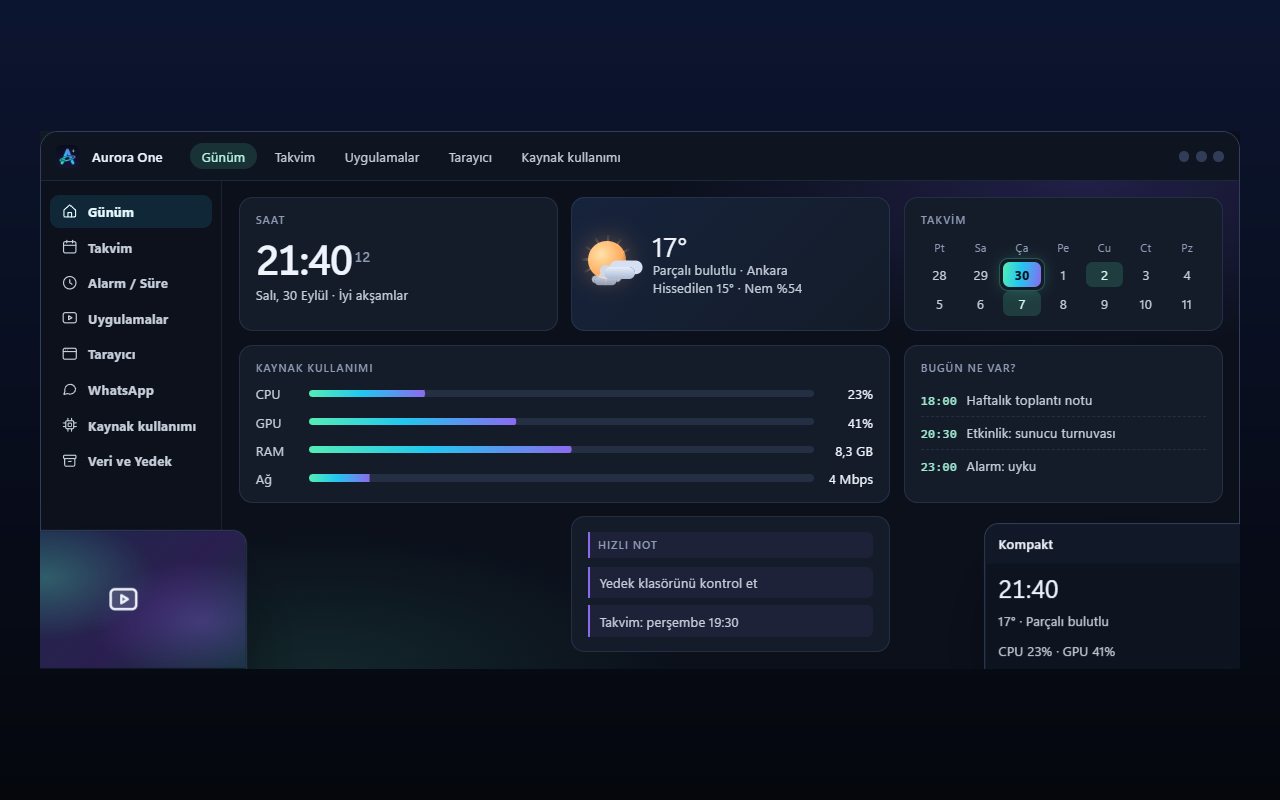
Representative view of the Aurora One App Today screen: section menu on the left, clock, weather, calendar and resource usage cards in the middle.Representative interface

Aurora One App

Windows 10 and 11 (64-bit)

Status: Sales and beta applications are not open yet

Brings the tools you open every day—from calendar and browser to WhatsApp, media apps and system monitoring—into one Windows application; your records stay on your computer.

  • One hub
  • Local records
  • Modular
  • Turkish only
Explore: Aurora One App
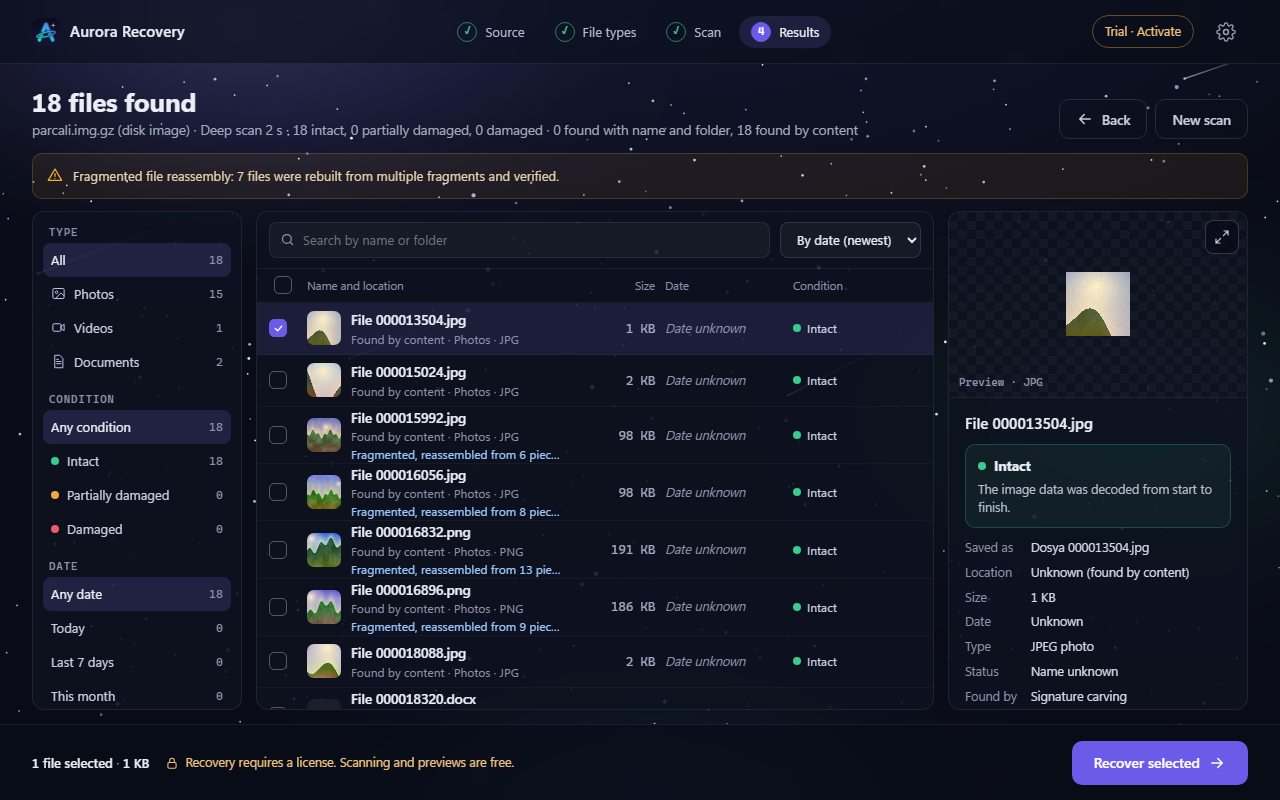
Sample view of the Aurora Recovery results screen: list of found files, each with an integrity label, and a preview pane on the right.Sample view

Aurora Recovery

Windows 10 (1607+) and Windows 11

Status: In final acceptance testing

Finds photos, videos and documents lost to deletion, formatting or corruption on USB drives, SD cards and disks—and tells you whether each file will open before you recover it.

  • Never writes to the disk
  • Honest labels
  • Free scan
  • 21 languages
Explore: Aurora Recovery
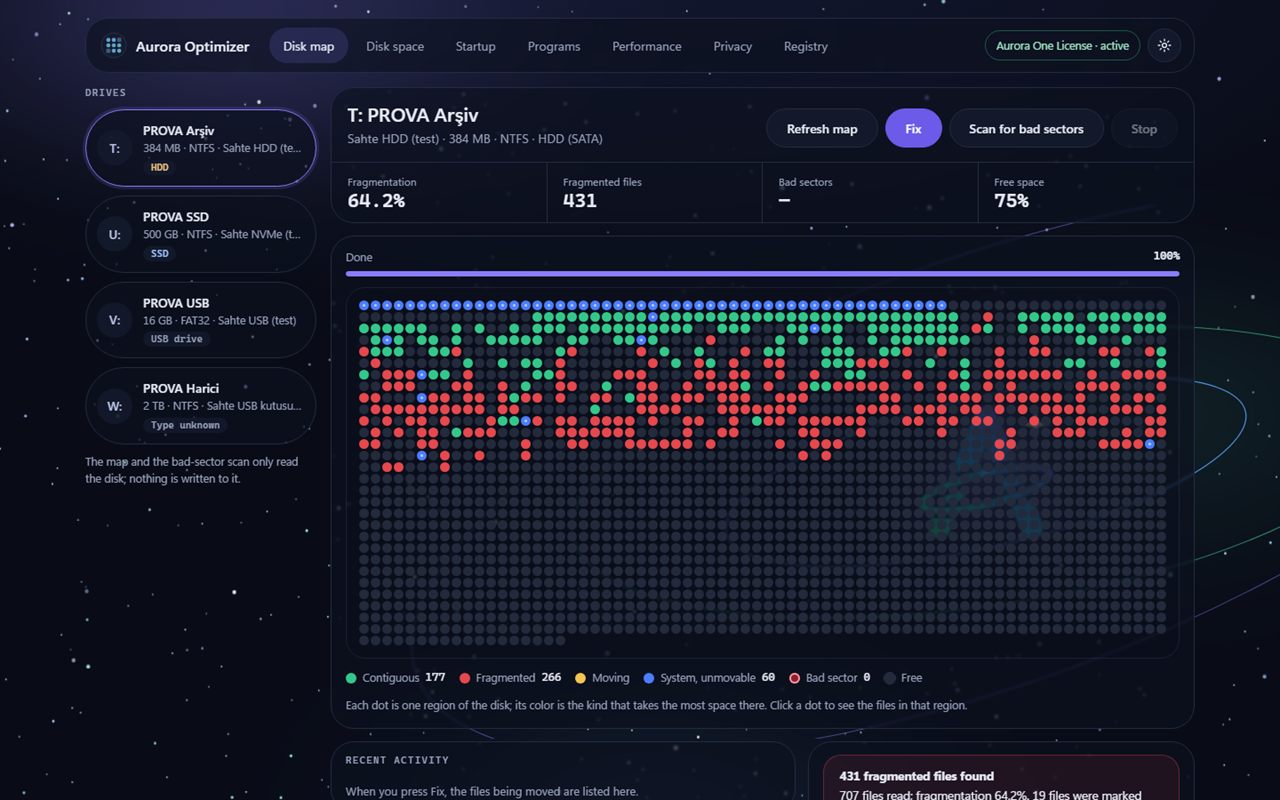
Sample view of the Aurora Optimizer disk map: test drives on the left, a map of coloured dots showing contiguous, fragmented and system regions in the middle, and the Fix button at the top.Sample view

Aurora Optimizer

Windows 10 (1607+) and Windows 11

Status: Beta · download coming soon

Examines your disk, free space, startup, programs and registry, and tells you what it suggests and why. It changes nothing until you choose, backs up every change first and keeps it reversible.

  • Backed up, reversible
  • No made-up numbers
  • Free scanning
  • 21 languages
Explore: Aurora Optimizer
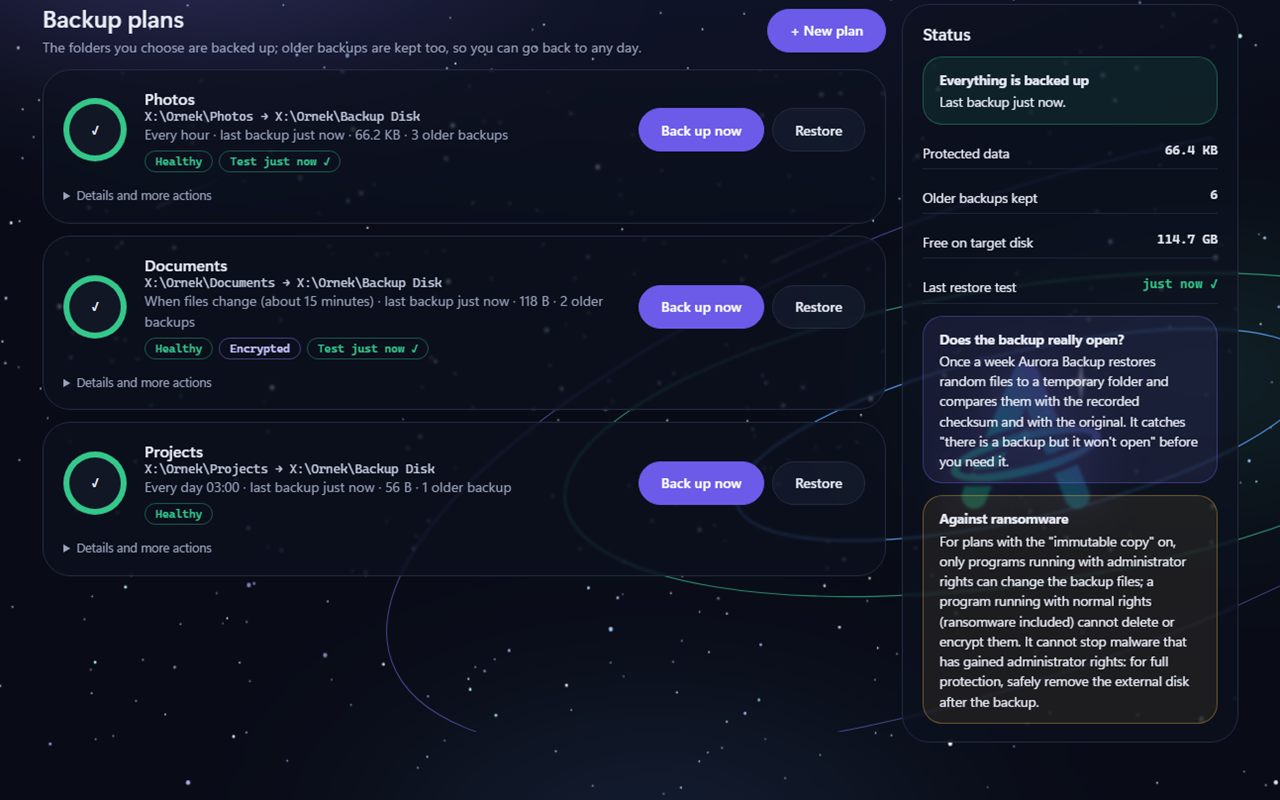
Example view of the Aurora Backup backup plans screen: three plans, each with Back up now and Restore buttons and a Healthy label; on the right, boxes explaining whether the backup really opens and the immutable copy against ransomware.Example view · sample data

Aurora Backup

Windows 10 and Windows 11

Status: Beta · download coming soon

Backs up the folders you choose to an external disk, a second disk or a network folder, keeps older backups too, and lets you go back to any day. It tests regularly that the backup really opens, and when restoring it never overwrites an existing file.

  • Restoring is always free
  • Tests that backups open
  • Never overwrites
  • 21 languages
Explore: Aurora Backup
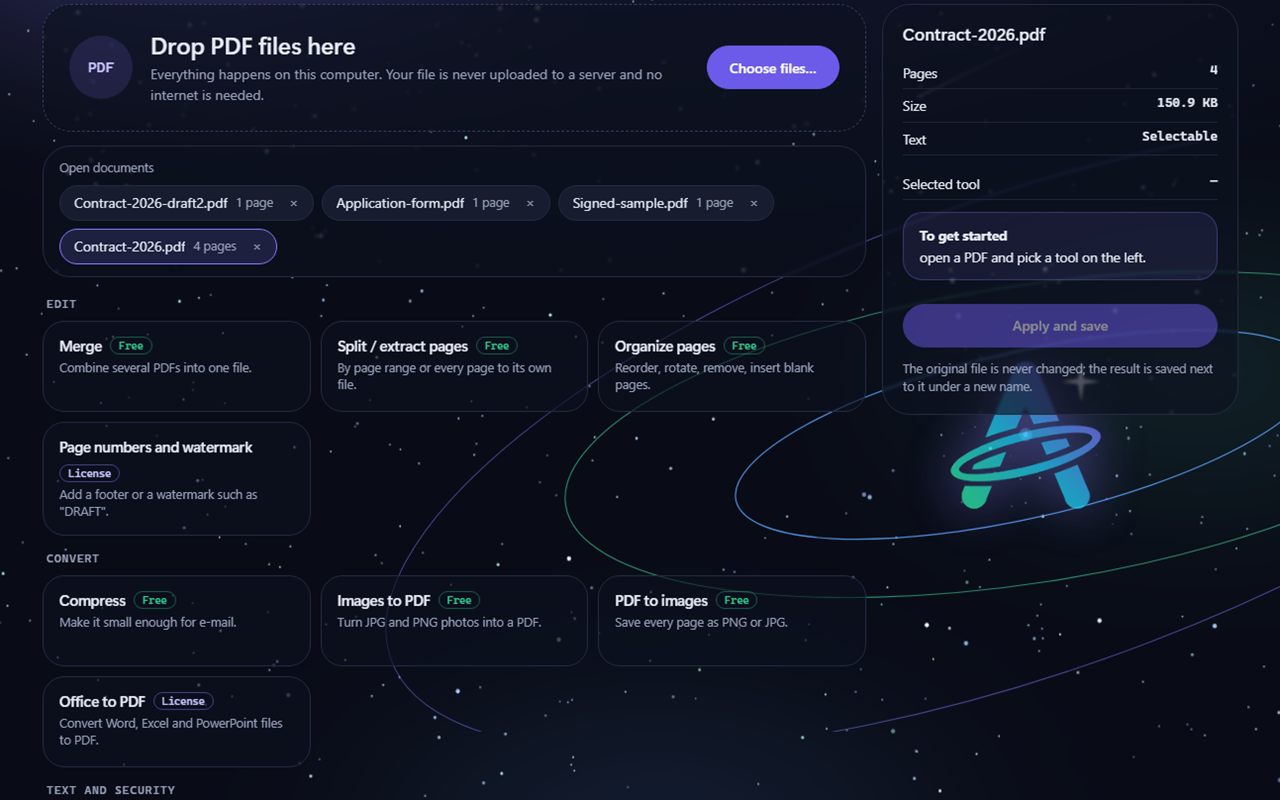
Example view of the Aurora PDF tools screen: a PDF drop area, open documents and tool cards labelled Free or Licence such as Merge, Split, Organize pages, Compress, Images to PDF and Office to PDF.Example view · sample data

Aurora PDF

Windows 10 and Windows 11

Status: Beta · download coming soon

Merges, splits, compresses and edits PDFs; truly removes personal information, adds passwords and signs electronically. Everything happens on your computer; your file is never uploaded to a server and the original is never overwritten.

  • Everything offline
  • True redaction
  • Never touches the original
  • 21 languages
Explore: Aurora PDF
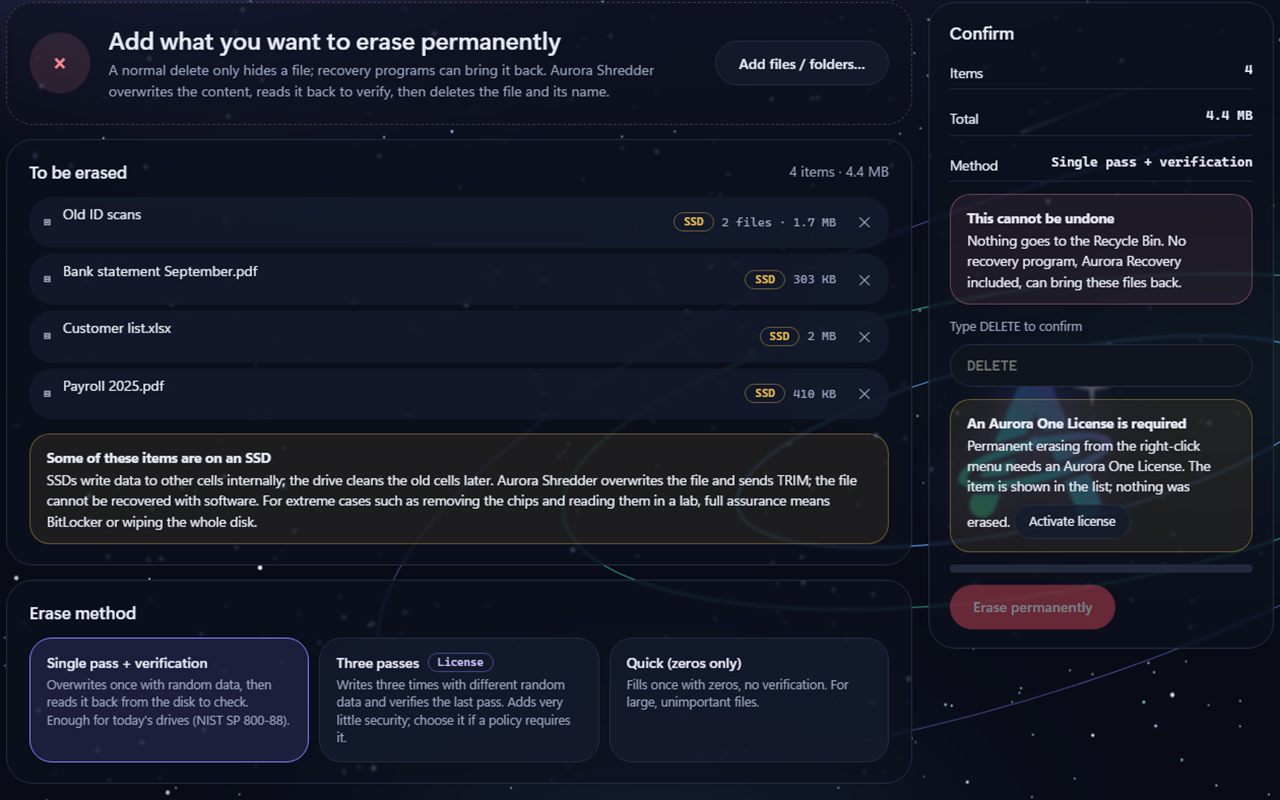
Example view of the Aurora Shredder Erase files screen: four items to erase, an SSD notice, the Single pass and verification method, a type-DELETE confirmation box and an Erase permanently button.Example view · sample data

Aurora Shredder

Windows 10 and Windows 11

Status: Beta · download coming soon

Overwrites a file's content, reads it back to verify, then deletes the file and its name; it also cleans free space and whole disks. It does not go to the Recycle Bin, and no recovery program, Aurora Recovery included, can bring it back. It tells you the limit on SSDs up front.

  • Overwrites, verifies
  • Never wipes the system disk
  • SSD limit stated
  • 21 languages
Explore: Aurora Shredder
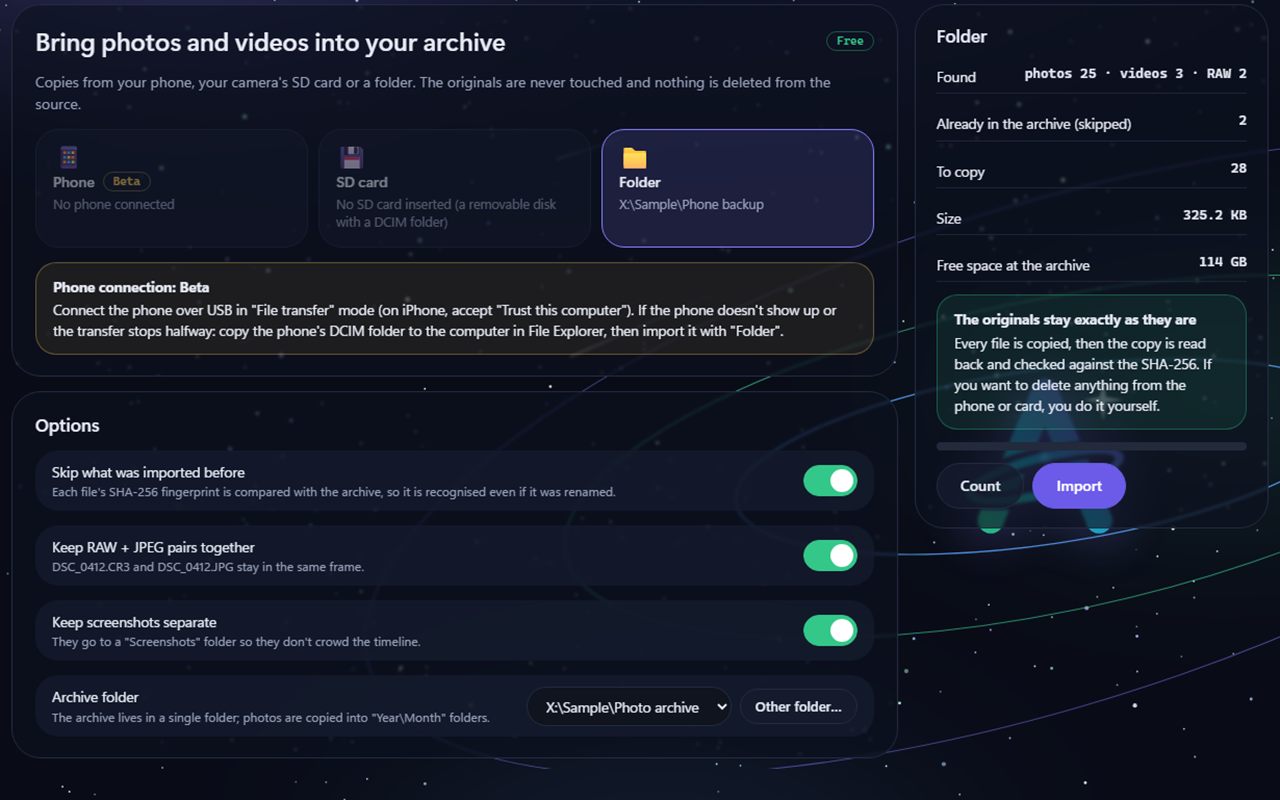
Example view of the Aurora Photos Import screen: Phone, SD card and Folder options, the Phone connection Beta note, import options and the Count and Import buttons on the right.Example view · sample data

Aurora Photos

Windows 10 and Windows 11

Status: Beta · download coming soon

Always copies photos and videos from your phone, SD card or a folder into the archive and never deletes anything from the source. It verifies the copies with SHA-256, groups them into events on a timeline and finds exact duplicates. No face recognition, no cloud and no online map.

  • Copies, never deletes the source
  • No permanent deletion
  • No face recognition
  • 21 languages
Explore: Aurora Photos

Back to the home page