Aurora One

Aurora Recovery · File recovery for Windows

Brings your lost files back, and tells you what is intact.

Aurora Recovery finds files lost to deletion, formatting or corruption on USB drives, SD cards, HDDs and SSDs. It never writes to the disk it scans, and it tells you—with the reason—whether each file will open before you recover it.

  • 27/27 files in a deleted folder, back with their names
  • 10/10 fragmented files reassembled
  • 0 false "Intact" labels (8 USB scenarios)
  • Free scan and preview
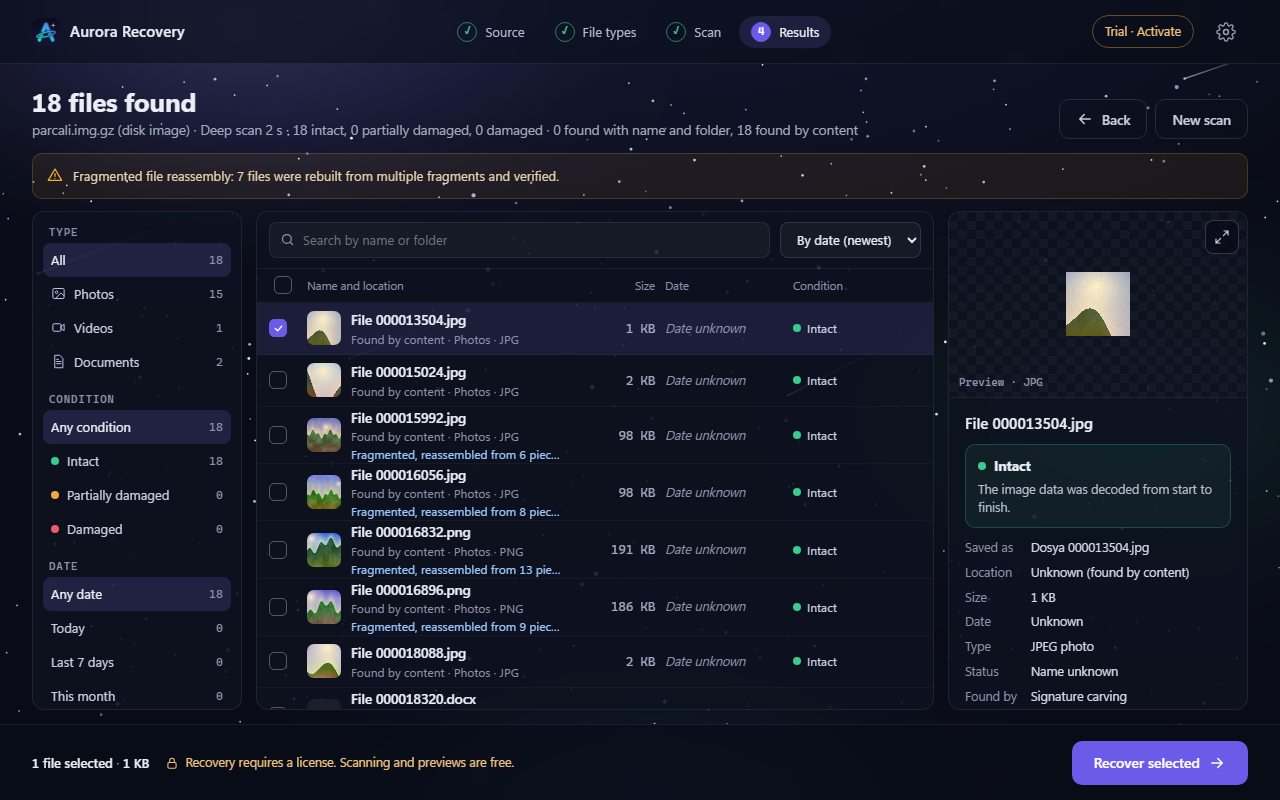
Sample view of the Aurora Recovery results screen: 18 files found on a test disk image, 7 fragmented files reassembled; Intact labels in the list, and the preview and integrity explanation of the selected photo on the right.
Sample view · taken with a test disk image; files and numbers on screen are examples

Three promises

First do no harm, then tell the truth

The biggest risk in file recovery is the recovery program itself writing to the disk. That is why Aurora Recovery only reads.

Never writes to the scanned disk

Aurora Recovery only reads the source disk. Recovered files are saved to another disk; it refuses to save to the same physical disk or to overwrite an existing file.

  • You are reminded not to save new files to that disk until recovery is done
  • Dangerous file names coming from the disk are cleaned
Tells you before you recover

Every found file is labelled "Intact", "Partly damaged" or "Damaged", with the reason: "top 63% of the photo is intact", "the whole file is zeros (SSD TRIM)" and so on.

  • Structure and content are checked for JPEG, PNG, ZIP/Office, PDF, MP4 and more
  • A video that cannot be verified is never called "Intact"; at most "Structure intact"

Never forces a locked disk

It does not try to open a BitLocker-locked drive; it asks you to unlock it in Windows. If a disk is dying, it first copies everything readable instead of hammering it.

  • A disk image is taken by skipping bad sectors
  • Administrator permission is requested only to read the disk

How it works

Four steps: where, what, scan, results

No technical knowledge needed. Pick the disk, say what you are looking for, and found files are listed while the scan runs. The screens below are sample views taken from the program's real interface with a test disk image and sample drive names; file names and numbers are examples.

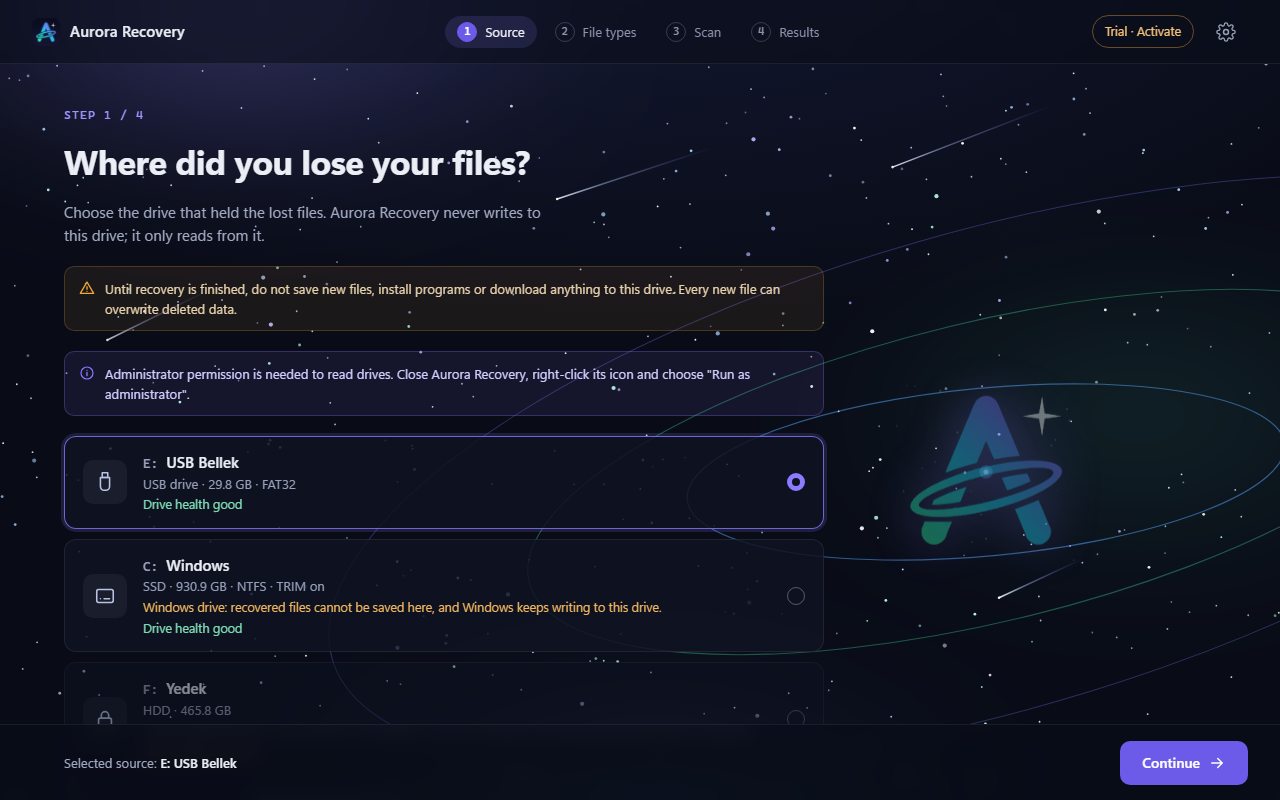
Aurora Recovery step one: choosing the drive. A USB drive is selected; a warning for the Windows disk; a BitLocker-locked drive is shown with a lock and cannot be selected.
1 · Where did you lose them?Choose the drive. It clearly says what happens with the Windows disk and with BitLocker-locked drives.
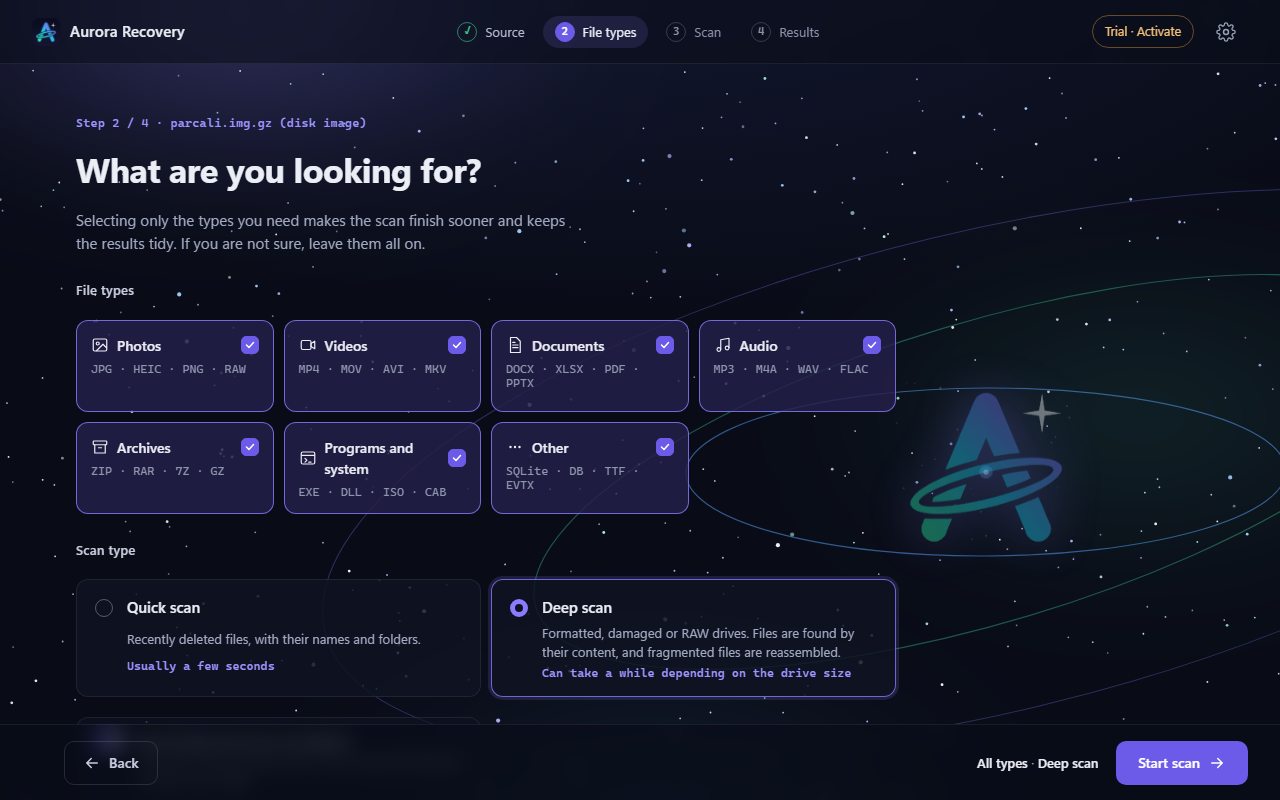
Aurora Recovery step two: file types (photos, videos, documents, audio, archives, programs and system, other) and quick or deep scan; deep scan is selected.
2 · What are you looking for?Pick only the types you need. Quick scan for recently deleted files, deep scan for formatted disks.
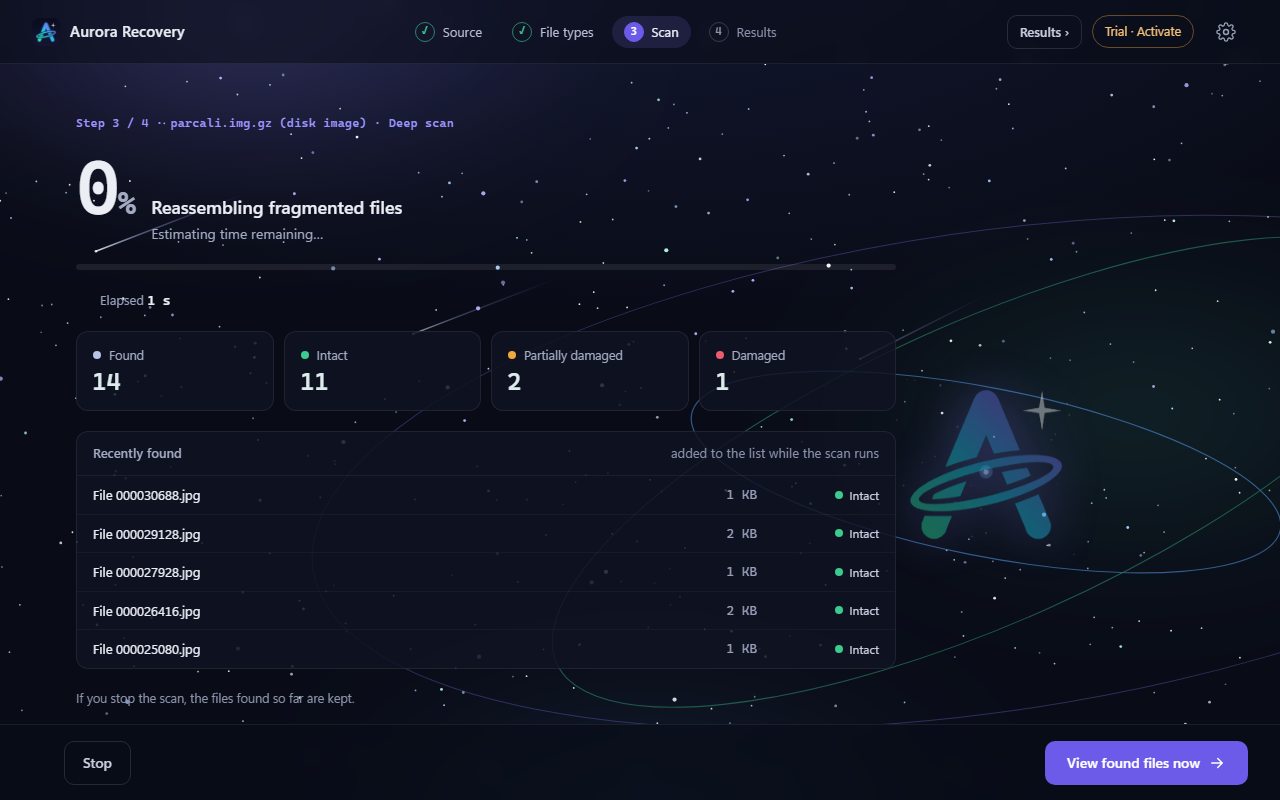
Aurora Recovery step three: fragmented files being reassembled during a deep scan; elapsed time, counters for found, intact, partly damaged and damaged files, and the latest found files.
3 · ScanSpeed and estimated time are shown live. You can stop at any time; found files are kept and the scan resumes where it left off.
Aurora Recovery step four: results list with type, status and date filters, preview and integrity explanation on the right.
4 · ResultsFilter by type, status and date; preview before you recover. Scanning and preview are free.

What it can do

From a deleted file to a broken video

Features marked Beta are built and tested but not yet verified on a real Windows device.

Deleted files and folders

On FAT12/16/32, exFAT and NTFS, deleted files come back with their names and folder paths. Long Turkish names are kept; deleted folders inside deleted folders are found too.

Formatted and RAW disks

When file system records are gone, files are found from their content: photos (RAW included), video, audio, Office and PDF documents, archives, e-mail. The end of each file is found by parsing its structure, not by cutting at a fixed size.

Fragmented file reassembly

JPEG, PNG, Word/Excel/PowerPoint and MP4/MOV files scattered in pieces on the disk are reassembled. If that is not possible, the reason is written in plain words.

Video repair (iPhone HEVC included)

MP4/MOV videos with a lost index or an interrupted recording are repaired using an intact video from the same device as reference. H.264 and iPhone HEVC (H.265); the AAC audio track is rebuilt too.

Preview before recovery

Photos, videos, audio, PDF and text files open before you recover them. Type, integrity, folder and date filters help you find what you need quickly.

Recovery report

The integrity, explanation, number of reassembled pieces and SHA-256 value of every recovered file are written to a CSV report.

Resume where it stopped

If the program closes or the computer restarts during a deep scan, the scan of the same disk continues where it stopped. The session record is never written to the scanned disk.

Name suggestions with local AI

Suggests names for PDF, Word and Excel documents that lost their names, using a language model that runs only on this computer (Ollama). Documents are not sent to the internet; the feature is off by default.

Dying disks Beta

Takes an image of the disk by skipping bad sectors without forcing them; the scan then runs on that copy. If the disk drops out, it resumes where it stopped. Disk imaging requires a licence.

Sources that never touch an SSD Beta

Scans the Recycle Bin, Windows shadow copies, File History backups and the thumbnail cache—often the best way to trace a file deleted from an SSD.

21 languages Beta

The interface is available in Turkish, English and 19 more languages; Arabic and Urdu are shown right to left. The Windows language is picked on first start and can be changed in Settings. The translations have not yet been reviewed by native speakers.

Measured and published

Tested on a real USB drive

On 9 October 2026 a real USB drive (ADATA, FAT32 / exFAT / NTFS) was written, deleted and formatted on Windows; every recovered file was compared byte by byte with the original. We also list the ones that did not match.

Tested on a real USB drive
ScenarioByte-identical to the originalNot identicalScan time
FAT32 · folder deleted27/27 (with names)05 s
FAT32 · written in fragments, then quick-formatted10/10 (9 fragmented files reassembled)0291 s
exFAT · deleted11/1101 s
exFAT · deleted and quick-formatted11/110212 s
NTFS · deleted (3 files NTFS-compressed)8/91 compressed image: labelled "Structure intact", content differs1 s quick + 292 s deep
NTFS · deleted and quick-formatted7/91 partial, 1 not found (compressed files)292 s
Video and audio · FAT32 · deleted4/4 (with audio tracks)03 s
Video and audio · FAT32 · deleted and quick-formatted4/4 (with audio tracks)0206 s
  • In none of the eight scenarios was a file that differs from the original labelled "Intact".
  • iPhone video (HEVC): tested with damaged copies made from a real iPhone video; in the video with its index deleted all 301 frames decoded identical to the original, and a video split into three pieces was reassembled byte-identical. Not yet tested with an original camera recording with sound.
  • These are measurements on a single USB drive; they do not promise the same result on every disk.

Limits

What it cannot do

The data itself decides what can be recovered. We say these up front:

Recovery from SSDs (TRIM) and overwritten data is not guaranteed. That is why scanning and preview are free: before buying a licence you see whether your file was found and whether it will open.

  • Overwritten data cannot be brought back by any program. Aurora Recovery shows such files as "Damaged"; it never presents them as intact.
  • SSDs often wipe deleted space within seconds (TRIM). Such files read back as zeros, and Aurora Recovery says so.
  • On FAT, old-style short-name files without a long name lose their first letter when deleted (_nvoice.pdf).
  • A single corrupted byte in a JPEG usually cannot be detected; cluster-level corruption is detected and located.
  • Progressive JPEGs and videos with a fragmented index cannot be reassembled; they are listed as "Partly damaged" with their first piece.
  • NTFS-compressed files may not be found once their disk record is gone (as the table above shows).
  • Name suggestions only cover PDF, Word (.docx) and Excel (.xlsx); accuracy depends on the model and the name is only a suggestion.
  • A deep scan is limited by the disk's read speed: 32 GB takes about 18 minutes on a USB 2.0 drive.

Free trial and licence

Scan, see, then decide

Scanning, preview and disk health are always free. A licence is needed to save the files you found, to save repaired videos and to image a disk. Aurora Recovery is not sold separately: it comes with the Aurora One Licence.

For everyone

Free trial

Free

Scan the disk, see the found files and their integrity labels, preview them.

  • Quick and deep scan
  • Integrity labels with reasons
  • Preview before recovery (without a licence the preview is downscaled and watermarked)
  • Disk health
  • Not included: Saving files (recovery)
  • Not included: Saving repaired videos
  • Not included: Disk imaging

Every program, one licence

With the Aurora One Licence

Save the files you found. The same licence covers every Aurora One program.

  • Everything in the free trial
  • Full-size, unwatermarked preview
  • Saving files (recovery) and recovery report
  • Fragmented file reassembly and saving repaired videos
  • Disk imaging
  • Licence activation needs the internet once; after that a renewal is tried every 24 hours and the program works without the internet for up to 14 days. Only the licence key and a digest of the device ID are sent; nothing from your files or disks is ever sent.
  • Free trial download (installer, AuroraRecovery-Kurulum-0.9.1.exe): [DOWNLOAD LINK]. Aurora Recovery is currently in final acceptance testing; the link will appear on this page when ready.
  • The installer is not code-signed yet, so Windows may show a SmartScreen warning the first time you run it. Code signing will be added before release.

Aurora One Licence This program is covered by the Aurora One Licence: one licence for every Aurora One program.

See pricing

System requirements

What you need

Operating system
Windows 10 (version 1607 or later) or Windows 11Acceptance tests were run on Windows 11.
Installation
Installer (.exe): AuroraRecovery-Kurulum-0.9.1.exeThe download link will appear on this page when ready.
.NET Framework
4.6.2 or laterAlready included in Windows 10 (1607 or later) and Windows 11; nothing extra to install.
Permission
Administrator permissionRequested to read the disk directly.
Sources
USB drive, SD card, HDD, SSD, disk image (.img, .dd, .bin, .raw)Disks connected to the computer and visible to Windows.
Save location
A disk other than the scanned oneRecovered files cannot be saved to the same physical disk.
Internet
Scanning, preview and recovery work fully offlineOnly licence activation needs the internet once (a renewal is then tried every 24 hours; it works offline for up to 14 days); update checks are optional. Name suggestions only connect to the local AI service on this computer.

FAQ

Frequently asked questions

Will my deleted file come back?

It mostly depends on what happened to the disk. If the file was deleted recently and nothing was written over it, the chances are good. If it was overwritten or the SSD wiped the space (TRIM), no program can bring it back.

That is why you scan first, for free: Aurora Recovery tells you whether each file will open before you recover it.

What do "Intact", "Partly damaged" and "Damaged" mean?

Intact: structure and content were verified from start to end; the file opens as it was. Partly damaged: part of the file is intact (for example the top of a photo) and it says how much. Damaged: the start of the file was found but the content is unusable; the reason is given.

For videos the content cannot be verified with a checksum, so the best label is "Structure intact".

Is anything written to my disk during recovery?

No. Aurora Recovery only reads the disk it scans and does not let you save recovered files to the same physical disk. It also asks you not to save new files to that disk until recovery is done.

Are my files sent to the internet?

No. Scanning, preview and recovery happen on your computer, fully offline. The optional name suggestion also uses a model running only on your computer; documents are not sent to the internet.

The only time the program goes online is licence activation and renewal; only the licence key and a digest of the device ID are sent. Nothing from your files or disks is ever sent.

Does Aurora Recovery work without the internet?

Yes. Scanning, preview and recovery are fully offline. Licence activation needs the internet once; after that the program tries to renew the licence every 24 hours and keeps working without the internet for up to 14 days.

How do I install it?

Aurora Recovery comes as an installer (.exe): run AuroraRecovery-Kurulum-0.9.1.exe and follow the steps. The required .NET Framework 4.6.2 is already included in Windows 10 (version 1607 or later) and Windows 11. The program asks for administrator permission so it can read the disk directly. The download link will appear on this page when ready.

How do updates arrive?

You check from inside the program with the "Check for updates" button. Automatic checking is off by default; you can turn it on. A downloaded update is not installed until its signature is verified, and installation always starts with your approval.

Can I recover from a BitLocker-locked disk?

Aurora Recovery does not force the lock. Unlock the disk in Windows, then scan again.

Can I try before buying?

Yes. Scanning, preview and disk health are free; without a licence the preview is downscaled and watermarked. A licence is needed to save files, to save repaired videos and to image a disk.

Aurora Recovery is not sold separately; it is used with the Aurora One Licence, which covers every Aurora One program. Prices and refund terms are on the Pricing page.

Our other products

Another tool built on the same principles

All of our products are designed for Windows, in Turkish first, and local-first.

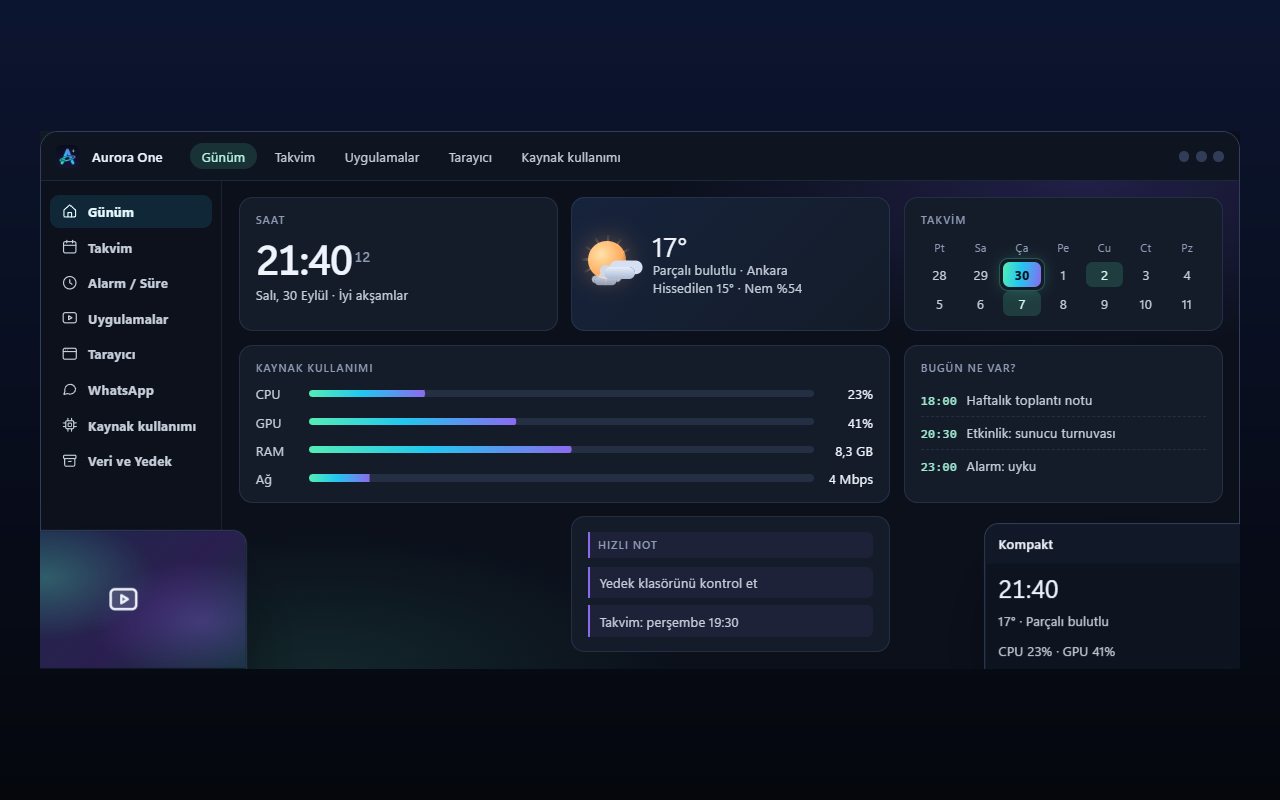
Representative view of the Aurora One App Today screen: section menu on the left, clock, weather, calendar and resource usage cards in the middle.Representative interface

Aurora One App

Windows 10 and 11 (64-bit)

Status: Sales and beta applications are not open yet

Brings the tools you open every day—from calendar and browser to WhatsApp, media apps and system monitoring—into one Windows application; your records stay on your computer.

  • One hub
  • Local records
  • Modular
Explore: Aurora One App

Back to the home page